 NexSHOPX-官方新闻
After Telegram's Native Passkey Launch, Verification Codes Are No Longer the Only Login Method
In December 2025, the official Telegram blog announced the full rollout of native Passkey support (source: Telegram official blog), allowing users to log in without passwords using Face ID, fingerprints, or local PINs, gradually replacing SMS verification codes that are vulnerable to interception and latency. This change has a profound impact on Telegram account purchases: previously, "receiving the verification code" was the ultimate proof of account control; now, Passkey private keys remain independently stored on the previous holder's device or password manager and do not automatically transfer with the phone number. This means that when purchasing a Telegram account, the standard for verifying control must be upgraded from "verification code reachability" to "credential sovereignty transfer." Based on the official security specifications disclosed, this article breaks down the mechanism, categorizes delivery forms, and provides an actionable verification and handover checklist.
Factual boundary statement: Official facts in this article are limited to the public announcements about Telegram's Passkey launch in December 2025, the storage location of private keys, session termination in the Devices menu, two-step verification and recovery email; the delivery form hierarchy and troubleshooting order are the author's empirical judgments and do not constitute official procedures.
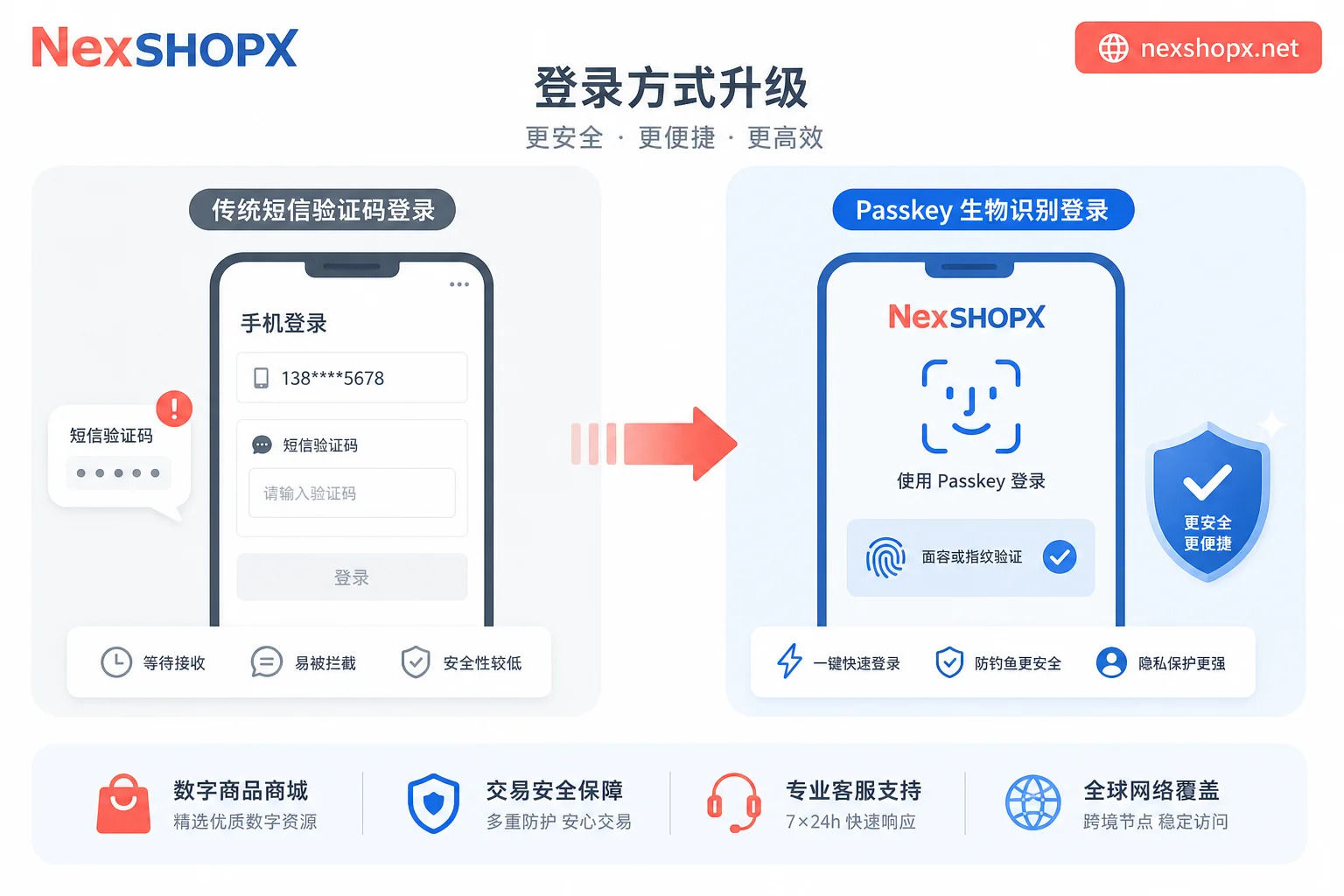
Mechanism Breakdown: Passkey Private Keys Stay on Previous Devices—Why "Receiving a Verification Code" Does Not Equal "Controlling the Account"
The official Telegram blog explains that Passkey encrypted private keys are stored on the user's local device or synchronized password manager. When a user logs in via device biometrics or PIN, the system performs key matching locally and only syncs encrypted copies of the key between devices, never sending the private key to the server. In other words, Passkey is bound to the "device," not the "phone number."
In contrast, SMS verification codes rely on the phone number to receive messages and are susceptible to interception (e.g., SIM swap attacks) and delays. But in account handover scenarios, the key difference is: receiving a verification code only proves that "this phone number can currently send and receive SMS," not that the previous holder hasn't continued storing the Passkey on their own device or password manager. If the previous holder hasn't actively deleted it, they can still initiate login from an authenticated device because Passkey authentication does not depend on whether the phone number has been transferred.
Therefore, to answer the long-tail question "Is buying a Telegram account with only a phone number safe?"—the conclusion is unsafe. Having only the phone number and verification code is like having a door key, but the previous owner might still have a spare key. True control requires you to actively clear old device credentials and rebuild your own Passkey.
Note: The above description of Passkey private key storage, except for Telegram's official explanation, is based on general principles of FIDO2/WebAuthn passkeys (refer to related coverage by FIDO Alliance) and is an explanation of the mechanism rather than itemized official Telegram statements.
Delivery Form Hierarchy: Phone Number + Verification Code / Number + Two-Step Verification Password / Complete Credentials and Recovery Channel—What Each Lacks
In the Passkey era, common delivery forms for Telegram account purchases can be categorized into three levels based on verification completeness (the following is an empirical judgment, not an official classification):
Level 1: Phone number + SMS verification code only
This is the most basic delivery but carries the highest risk. Advantage: Quick verification of phone number ownership; Disadvantage: It does not include the two-step verification password, recovery email, or cleanup of old device Passkeys. If the previous holder hasn't actively logged out and deleted their Passkey, the buyer may be remotely logged out by the previous holder during use, or the account may be taken over by them.
Level 2: Phone number + Two-step verification password
This form adds the cloud password, meaning you can manage Two-Step Verification in the settings. However, note: the two-step verification password is just one credential for controlling the account; the previous holder can still access the account directly through their logged-in devices because the device session has not been cleared. Additionally, if the previous holder set up a recovery email that is not included in the delivery, password resets or account recovery may be blocked.
Level 3: Complete credentials and recovery channel
Includes phone number, two-step verification password, access to the recovery email, and all active devices have been cleared, and the previous holder's Passkey has been deleted. This form is closest to "effective delivery," but you still need to consolidate control immediately after receipt following the four-step checklist.
This also addresses the long-tail keyword "What credentials are needed for Telegram account handover"—not only the verification code and two-step verification password, but also recovery email access and proactive execution of device session cleanup.
| Delivery Form | Included Credentials | Residual Risk | Mandatory Actions Upon Receipt |
|---|---|---|---|
| Phone number + SMS code only | Phone number, temporary code | Previous holder can remotely log out or take over | Immediately terminate all other sessions and set up two-step verification |
| Phone number + Two-step verification password | Phone number, two-step password | Previous holder's logged-in devices not cleared; recovery email may be uncontrolled | Terminate all other sessions, reset two-step verification password and bind recovery email |
| Complete credentials and recovery channel | Phone number, two-step password, recovery email access | Old device Passkey may remain | Delete old device sessions, bind your own Passkey |
Verification criterion: Verifiable = sessions can be cleared + two-step verification and recovery email can be independently reset by the buyer.
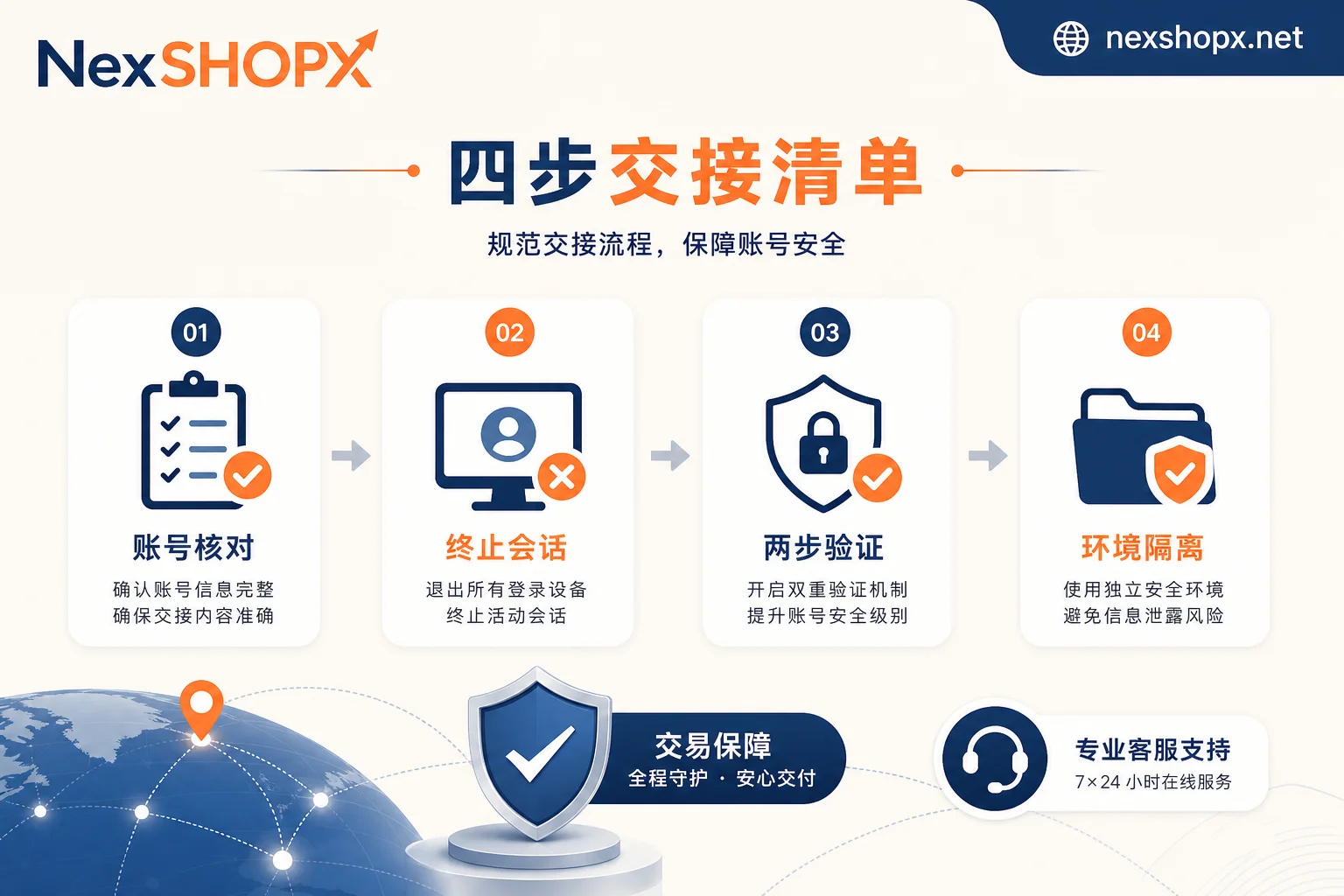
Four-Step Checklist on Receipt Day: Account Status Check → Session and Device Review → Bind Your Own Two-Step Verification and Passkey → Login Environment Isolation
After completing the delivery and logging in for the first time, it is recommended to complete the following steps on the day of receipt (steps 1 and 2 are based on Telegram's official procedures):
- Check account status: After logging in, go to "Settings - Privacy and Security - Devices" to view the list of currently logged-in devices and active sessions. Confirm that all devices, including your own, are known; if there are unrecognized devices, note their models and online status.
- Review and terminate other sessions: In the Devices menu, tap "Terminate all other sessions" to force logout all sessions except the current device. This action clears login tokens on old devices, including the previous holder's Passkey-associated sessions (Passkey itself is a local device credential, but terminating sessions prevents old devices from accessing the account unless they log in again). After execution, you should see only the current device in the list. This directly addresses the long-tail issue "How to log out of Telegram account on other devices."
- Bind your own two-step verification password and Passkey: In Telegram's Two-Step Verification settings, set a cloud password and bind a recovery email you can access. Then, on your own device, follow the current Telegram client prompts to create a Passkey (specific menu names depend on the client interface; this article does not specify). This process covers the key operations for "How to bind Telegram Passkey" and "How to reset Telegram two-step verification password." Note that resetting the two-step verification password should be done when you have access to the recovery email; otherwise, it may trigger an official recovery process.
- Login environment isolation: After completing the above steps, temporarily avoid logging in on public devices or others' devices. If you need to use multiple devices, log in on your own fixed devices and avoid storing sensitive information in browser extensions. This ensures that the new Passkey's private key exists only on devices you control.
After completing these four steps, you've upgraded from "can receive verification codes" to "holding credential sovereignty." If you notice any anomalies during this process, you can refer to the troubleshooting logic in the next section.
When First Login Requires Additional Verification or Fails: Layered Troubleshooting for Environment, Credentials, and Account Status
Even with complete credentials, you may encounter login issues. Here's a layered troubleshooting path to answer "What to do if Telegram account first login verification fails."
Layer 1: Environment and Network
Check network stability and whether using a VPN or proxy causes an abnormal IP. Telegram may require additional verification for unusual IPs. Try switching network environments (e.g., from Wi-Fi to mobile data) and retry. Also, ensure the device time is correct. (The following are the author's empirical troubleshooting suggestions, not official rules published by Telegram.)
Layer 2: Credentials
- Verification code: Ensure you enter the latest received code, check the phone number is correct, and note that SMS might be intercepted.
- Two-step verification password: If forgotten or incorrect, and you have bound a recovery email, you can try the official reset process; if no recovery email, you may need to go through the official account appeal process, which is subject to platform review and the outcome cannot be predicted.
- Passkey: If face or fingerprint recognition fails, check if biometrics are enabled on your device, or try re-adding the Passkey.
Layer 3: Account Status
If the account is restricted or banned by the platform, login will show an error. In this case, you need to contact Telegram's official appeal channel; third-party customer service cannot influence platform decisions.
During troubleshooting, record the operation time, error messages, network type, and other details, and provide these to your supplier or platform customer service for quick problem identification.
Where NexSHOPX Can Help: Multi-category Account Resources, Self-service Ordering, Fast Delivery, and Limited-time Login After-sales
After understanding the verification logic, you may wonder: where can I buy a Telegram account more reliably? NexSHOPX, as an online store for cross-border operations, offers various account resources including Instagram, Google/Gmail, Telegram, supports self-service ordering and fast delivery, and has 24/7 Telegram customer service; if you still cannot log in after following the checklist in this article, you can contact customer service within the limited after-sales period.
But it is important to clarify boundaries: NexSHOPX does not promise permanent account security, does not guarantee no bans, and does not replace Telegram's official identity verification or risk control processes. Its value lies in providing a centralized purchasing channel, reducing the time cost of users searching for suppliers. When choosing, prioritize merchants with clear delivery instructions and execute the four-step checklist immediately after receipt.
Compliance Reminder: Comply with Telegram's Terms of Service, Local Laws, and Real-name/KYC Requirements
Finally, it's essential to remind: using Telegram accounts must strictly comply with Telegram's Terms of Service, local business laws, and real-name/KYC requirements. This article only discusses compliant purchasing and credential verification and does not provide any methods to bypass identity verification, risk control, or appeal processes. When conducting any account handover, ensure the purchased account has a legal source and that usage complies with platform rules; otherwise, you may face ban risks.
Key Action Recap: On the day of receipt, complete session cleanup, two-step verification reset, and Passkey rebinding; if problems arise, troubleshoot layer by layer: environment-credentials-account status; choose channels that provide clear delivery information (e.g., NexSHOPX) and understand after-sales boundaries; and follow compliance requirements in daily use.


Comments(0)