 NexSHOPX-官方新闻
Purchased Gmail accounts do not all support sending emails directly, nor can you use regular passwords to connect via SMTP or use web-based POP to centralize verification codes from dozens of sub-accounts.
Specifically, in 2026, before and after buying a ready-made Gmail account, three hard rules will directly determine whether the account can run your business:
- Not all specs can send emails: Some low-cost ready-made accounts are specifically designed for code reception scenarios, can only receive, not send; even for full send-receive specs, personal free Gmail has a rolling 24-hour limit of 500 emails, and new accounts sending intensively right away will trigger restrictions.
- SMTP/IMAP has completely disabled direct password connections: Google has fully shut down 'less secure apps', so entering your Gmail login password directly in code, website backends, or email clients will inevitably fail; you must switch to OAuth 2.0, or generate a 16-character app-specific password after enabling two-step verification.
- Web-based POP fetching for the main mailbox is gradually being phased out: Starting in 2026, Gmail has stopped offering web-based 'Gmailify' and POP 'check mail from other accounts' for new configurations, so centralized code reception from multiple accounts requires switching to auto-forwarding, IMAP client aggregation, or independent environment management.
If you are still comparing pure email accounts vs. full ecosystem accounts, you can first refer to How to Choose a Gmail Account Purchase; if you have already bought an account and are about to log in for the first time, it is recommended to follow the First Login Verification Guide together.
I. Align Use Case Before Ordering: Don't Buy the Wrong Spec for These 3 Needs
Many users searching for 'Gmail account' assume all @gmail.com accounts have identical functions by default, only to find after delivery that they bought too much cost or too few permissions. Breaking down by actual business scenarios, you must at least distinguish three tiers before ordering:
1. Pure Code Reception and One-time Registration Receipts (Receive Only, No Send)
If your purpose is only to register on overseas platforms and receive email verification codes, and you do not need to send emails at all, be sure to check whether the product details page states 'receive only, cannot send' before buying. This spec is usually positioned for low-cost code reception, and forcing it for business communication or automated sending simply won't work.
Moreover, if you are only receiving codes for large-scale social media matrices or regular sites, you don't need to put all your budget on Gmail; you can combine with the ideas in Register and Receive Codes: Buy Gmail or Outlook Accounts according to platform risk control requirements, or purchase verified Yahoo, Proton, Onet.pl, Firstmail from NexSHOPX's Overseas Email Account Zone (Onet.pl also offers accounts older than one year) to spread the risk of a single email provider.
2. Two-way Business Communication and Development Testing (Must Send and Receive)
If you need to send and receive foreign trade emails, test software system registration/notification email flows, or serve as an independent site's test sending entry, when making a Gmail account purchase at NexSHOPX, choose a brand-new exclusive ready-made email spec that explicitly supports normal email sending and receiving and is suitable for development testing (some specs come with a recovery email).
At the same time, be aware of the sending ceiling of personal Gmail: according to Google's official rules, personal free Gmail can send at most 500 emails within a rolling 24-hour window (including daily recipient limits), and exceeding this will suspend outgoing emails for up to 24 hours. Therefore, it is suitable for light contact and development debugging, never use a newly purchased account directly as a mass marketing machine; sending bulk development emails in a short time not only easily bounces but also directly triggers abnormal account suspension.
3. Need Cross-platform 'Sign in with Google' and Full Suite of Services
If, besides sending and receiving emails, you also need to log in to YouTube, Google Play, Google Drive, Workspace, or frequently click 'Sign in with Google' quick authorization on various AI tools and overseas websites, pure email specs are often not reliable enough. It is recommended to directly configure multi-region ready-made accounts that have passed phone verification before delivery from NexSHOPX's Google Account Zone, and choose new or old accounts according to risk control sensitivity.
II. Development Testing and Client SMTP/IMAP Connection: Why Does It Keep Erroring in 2026?
Many developers and website builders, after buying Gmail, directly fill in the email address and login password into Python scripts, WordPress SMTP plugins, or third-party clients, only to have the server immediately return 535-5.7.8 Username and Password not accepted or 534-5.7.9.
This is not because the account is broken, but because the authentication protocol has changed. Google first discontinued 'Less Secure Apps' regular password access for personal accounts in 2022, then completely closed the channels for connecting to SMTP, IMAP, and POP via regular account passwords across all platforms (including Workspace) from March to May 2025; and since early 2025, it has removed the manual IMAP toggle option in personal Gmail web interface (personal accounts have it enabled by default).
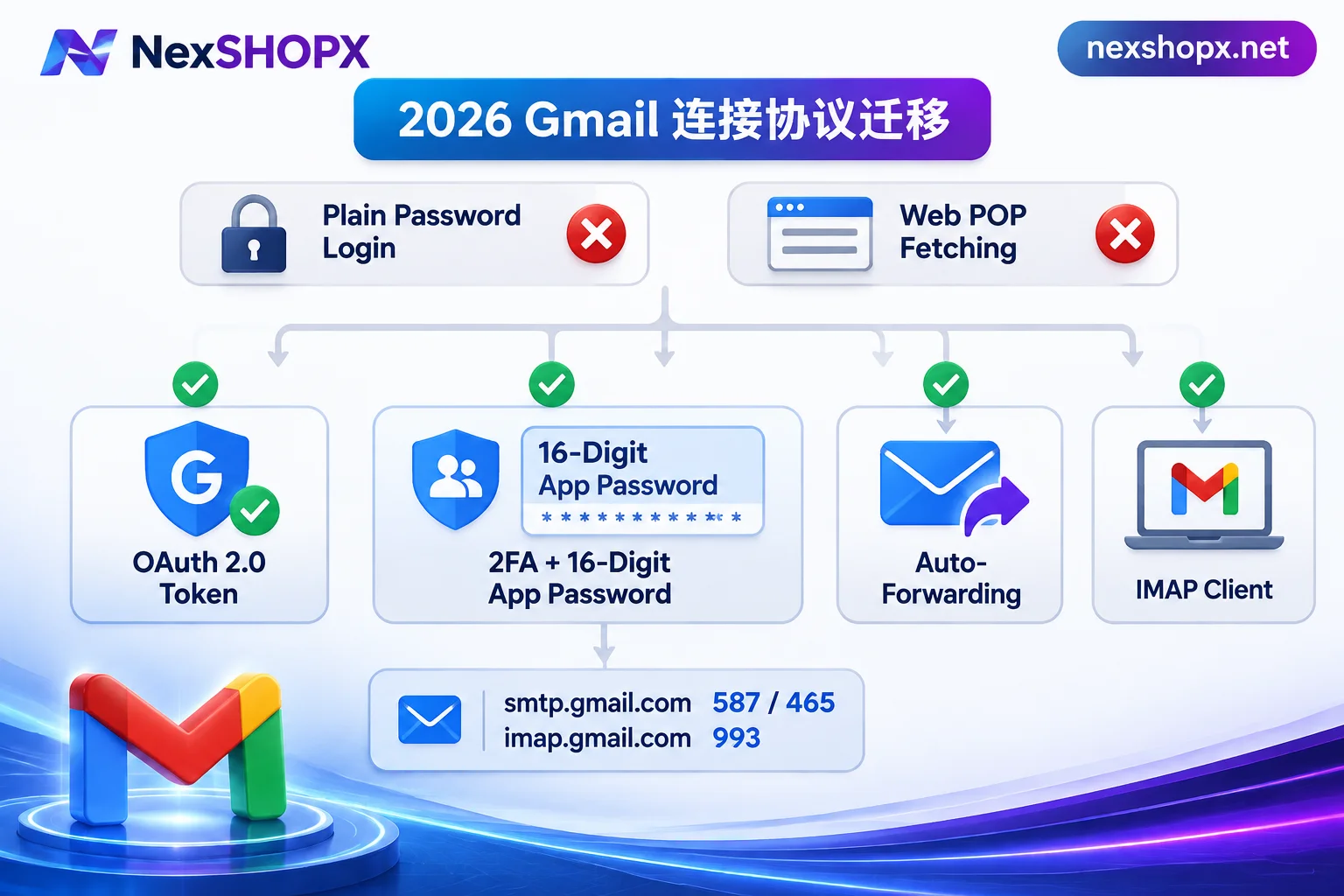
In 2026, to connect a purchased Gmail to a client or test script, there are only two compliant paths:
Path A: Use OAuth 2.0 Authorization (Google's Official Recommendation)
If you use a mainstream modern email client (such as Thunderbird, Apple Mail, new Outlook), or your own developed program can integrate with Google Cloud Console's OAuth 2.0 authorization flow, simply select 'Sign in with Google / OAuth 2.0' popup authorization when adding the account. This method does not require storing the login password in third-party software and is not affected by subsequent password changes.
Path B: Enable Two-Step Verification + Generate a 16-character App-Specific Password (Suitable for Traditional SMTP Forms)
If your website backend or test script only provides traditional 'SMTP host + username + password' input fields, you must use a 16-character app-specific password (App Password):
- Confirm the account has passed the security stability period: Do not continuously change multiple security settings within minutes of first login on a new IP; first confirm the login environment is stable, and operate under the condition that the product page allows security modifications.
- Enable two-step verification (2FA): Visit
myaccount.google.com/securityand confirm the account has two-step verification enabled (the app-specific password entry will not appear if 2FA is not enabled). - Generate a 16-character dedicated password: Visit
myaccount.google.com/apppasswords, enter an easily recognizable name (e.g.,DevTestSMTP), click create, and immediately copy this 16-character letter password—it is displayed only once. Fill in server parameters (enter the 16-character code as password, without spaces):
- SMTP outgoing server:
smtp.gmail.com, port465(SSL/TLS) or587(STARTTLS), username is the full@gmail.comaddress. - IMAP incoming server:
imap.gmail.com, port993(SSL/TLS).
- SMTP outgoing server:
Easily overlooked pitfall: As soon as you later change the login password of that Google account, all previously generated app-specific passwords will be automatically revoked by the system, and all website sending or test scripts relying on that password will instantly中断, requiring regeneration and replacement.
If your test scenario explicitly requires a low-cost email with no cumbersome configuration and out-of-the-box native protocols, you can also compare NexSHOPX's Outlook / Hotmail Email Zone—this category clearly distinguishes between specs with 'IMAP/POP/SMTP enabled' and specs limited to web login on the product page, so you can choose as needed to save time.
III. Batch Buying Accounts for Centralized Verification Code Reception: What to Do After POP Aggregation Discontinuation in 2026?
Previously, many teams would buy a batch of email accounts and habitually open a main Gmail web interface, then in 'Settings → Accounts and Import → Check mail from other accounts' use POP to pull emails from multiple sub-accounts into one inbox to view verification codes uniformly.
But starting from the first quarter of 2026, Google has stopped providing Gmailify and web-based POP fetching of other mailboxes for new users (existing configurations are also in the countdown to retirement, to be completely discontinued in January 2027). If you find that the POP check mail entry is missing in your newly purchased Gmail settings, there is no need to repeatedly troubleshoot the browser; there are three alternatives:
- Set up 'Auto-forwarding' on the sub-email side (the most hassle-free web-based solution): Change passive 'Pull' to active 'Push', and log in to the sub-email that needs to receive codes to set up automatic forwarding to the main email. But note two things: first, do not batch modify forwarding settings all at once on a newly purchased account; stabilize the login environment first; second, if multiple accounts frequently forward verification codes from the same type of platform to the same main email, they may be classified as spam and go to the Spam folder, so remember to regularly check the spam box.
- Use desktop clients or mobile Gmail App to mount IMAP: The Gmail mobile app and desktop clients like Thunderbird still support adding multiple accounts via standard IMAP for receiving emails. Note to control the number of accounts concurrently pulling under the same exit IP to avoid high-frequency concurrent requests triggering risk control.
- For high-value accounts, insist on independent login in separate environments: For emails bound to advertising accounts, payment subscriptions, or core social media assets, the safest approach is still to store and log in one account per environment independently; do not hang all high-weight accounts in the same client just for convenience.
IV. Receipt Acceptance and Long-term Account Preservation: How to Use Recovery Email, How Long Until Idle Accounts Are Recycled?
Many novices encounter pitfalls after purchase, not because the account itself has quality issues, but because they get stuck on recovery email misoperation and long-term neglect.
1. How to Pass Verification Without the Password for the Delivered 'Recovery Email'?
Some ready-made account specs are delivered in the format 账号----密码----辅助邮箱, usually without the login password for the recovery email itself. This is a normal delivery form—when you first log in to Google on a new device and an identity verification popup appears, be sure to select 'Confirm your recovery email', then fully enter the recovery email address from the delivery list to pass verification directly.
Never hastily click 'Send verification code to recovery email' or 'SMS verification'; once you choose wrong and trigger a security lock, it is very difficult to remedy later. After passing the first-login observation period and entering the security handover stage, then follow the Gmail Account Security Settings Modification Order to safely replace it with your own controlled recovery email and TOTP authenticator.
2. Protect Warranty and First-Login Boundaries
When ordering at NexSHOPX, the store supports both registered purchase and guest checkout, and in-stock items are automatically delivered after payment confirmation; afterwards, you can view and retrieve card key information on the Order Query Page with your order number; for pre-orders or bulk needs, you can confirm stock and negotiate via Telegram Customer Service (Alipay and USDT supported, settled in CNY).
But before ordering, be sure to check two things: first, after successful payment, order cancellation is not supported unless otherwise specified; second, each product page will state the first-login time limit, warranty period, and data modification restrictions (for example, some categories prohibit password or data changes during the warranty period; see What Does It Mean That Data Cannot Be Modified During the Warranty Period and Terms of Service and Warranty Rules for details). Failure to log in on time, violation of data modification restrictions, or triggering anti-cheat mechanisms by batch account switching in the same environment are not covered by the replacement warranty.
3. Don't Ignore the '2-Year Inactivity Deletion Policy' When Stockpiling Backup Accounts
If you buy multiple Gmail backups at once, do not throw them into a spreadsheet and ignore them for two years. According to Google's inactive account policy, if a personal Google account has no valid activity across all Google services for 2 consecutive years, Google has the right to permanently delete the account and all its emails and cloud data; and once deleted by the system due to inactivity, the original @gmail.com address can no longer be re-registered or recovered by anyone.
It is recommended to establish a regular rotation ledger for long-term retained business Gmail accounts, logging in and completing at least one email reading or normal use in a stable environment every six months to a year, and bind your own long-term controllable recovery email, so that important business assets do not quietly expire and reset to zero.