 NexSHOPX-官方新闻
When you're about to download an overseas app on your iPhone or iPad, or just topped up a gift card to subscribe to AI and streaming services, the screen suddenly pops up "Your Purchase Could Not Be Completed, submit application to Apple Support for review"; or you try to register yourself but get stuck repeatedly at the last step with "Cannot Create Your Account at This Time."
Entering Q4 2026, Apple has once again tightened its review mechanisms for cross-region account creation, region changes, and in-app purchases (IAP). Especially in late October 2026, Apple's official support page specifically added explanatory clauses for submitting "Purchase Could Not Be Completed" for review. Facing increasing time costs and risk of fund blockage, overseas Apple ID purchase is no longer just a convenience option, but a necessary configuration for cross-border business teams and high-frequency tool users to ensure uninterrupted workflows.
Previously, in our "Overseas Apple ID Purchase Guide: Multi-Region Account Selection for US, Japan, Turkey, etc., and Pitfalls of In-App Purchases with New vs. Old Accounts", we introduced the basic logic of multi-region account selection. This article, combined with the latest 2026 Apple purchase review developments, starts from underlying pain points and breaks down how to thoroughly avoid in-app purchase blocks and device lock risks through a strategy of "on-demand account selection + subscription offloading."
I. Two Major Pain Points of Apple's Risk Control in Q4 2026: Why Self-Registered Accounts and Gift Card In-App Purchases Are Increasingly Difficult?
When many users encounter errors, their first reaction is to suspect network issues or invalid gift cards. However, based on Apple's recently updated support documents and numerous real-world test cases, the core issue lies in the upgrade of account risk control models:
1. Registration and Region Change Thresholds Soar: "Cannot Create at This Time" and the Disappearing "None" Option
Self-registering an overseas account now requires passing four checkpoints simultaneously: email purity, phone number association history, device environment, and tax-free state address verification. If any item is judged abnormal by the system, it will directly pop up "Cannot Create Your Account at This Time."
Attempting to change the region of an old China account to US, Japan, or Hong Kong is equally difficult: not only must you clear any account balance (even 0.01 yuan), cancel all subscriptions and wait for the cycle to end, and exit Family Sharing, but more troublesome is that many accounts do not even show the "None" payment option when changing regions, forcing verification of a valid local payment method, causing the region change to fail midway.
2. "Purchase Could Not Be Completed" Triggers Manual Review: New Accounts Top-Up and Spend Immediately Are Hit Hardest
In late October 2026, Apple clarified in its support documents the interception mechanism for abnormal in-app purchases: when the system detects unauthorized or high-risk purchase behavior, it will pop up "Your Purchase Could Not Be Completed, submit application to Apple Support for review."
In practice, a newly registered blank account, once it redeems a gift card and immediately initiates a subscription in-app purchase for ChatGPT Plus, Claude, or overseas games on the same day, has about a 90% probability of triggering this purchase restriction. At this point, although the gift card balance in the account is safe, the purchase permission is temporarily locked, and it takes 24 to 48 hours or even longer to go through online customer service (Live Chat) or submit the review process, seriously delaying urgent use cases.
II. How to Choose an Overseas Apple ID Purchase? Fine-Grained Division of Labor Between Blank New Accounts and Old Accounts with Purchase History
Since self-registered accounts and blind top-ups are prone to pitfalls, directly purchasing ready-made Apple ID accounts has become a more reliable alternative. In the NexSHOPX store, overseas Apple IDs cover multiple popular regions including US, Japan, Hong Kong, Taiwan, Singapore, Turkey, UK, and South Korea, and upon delivery typically have the corresponding region address added, no payment method bound, and iCloud not activated.
To avoid triggering review again when using the purchased accounts in business, you must strictly distinguish the purposes of "blank new accounts" and "old accounts with purchase history" when purchasing:
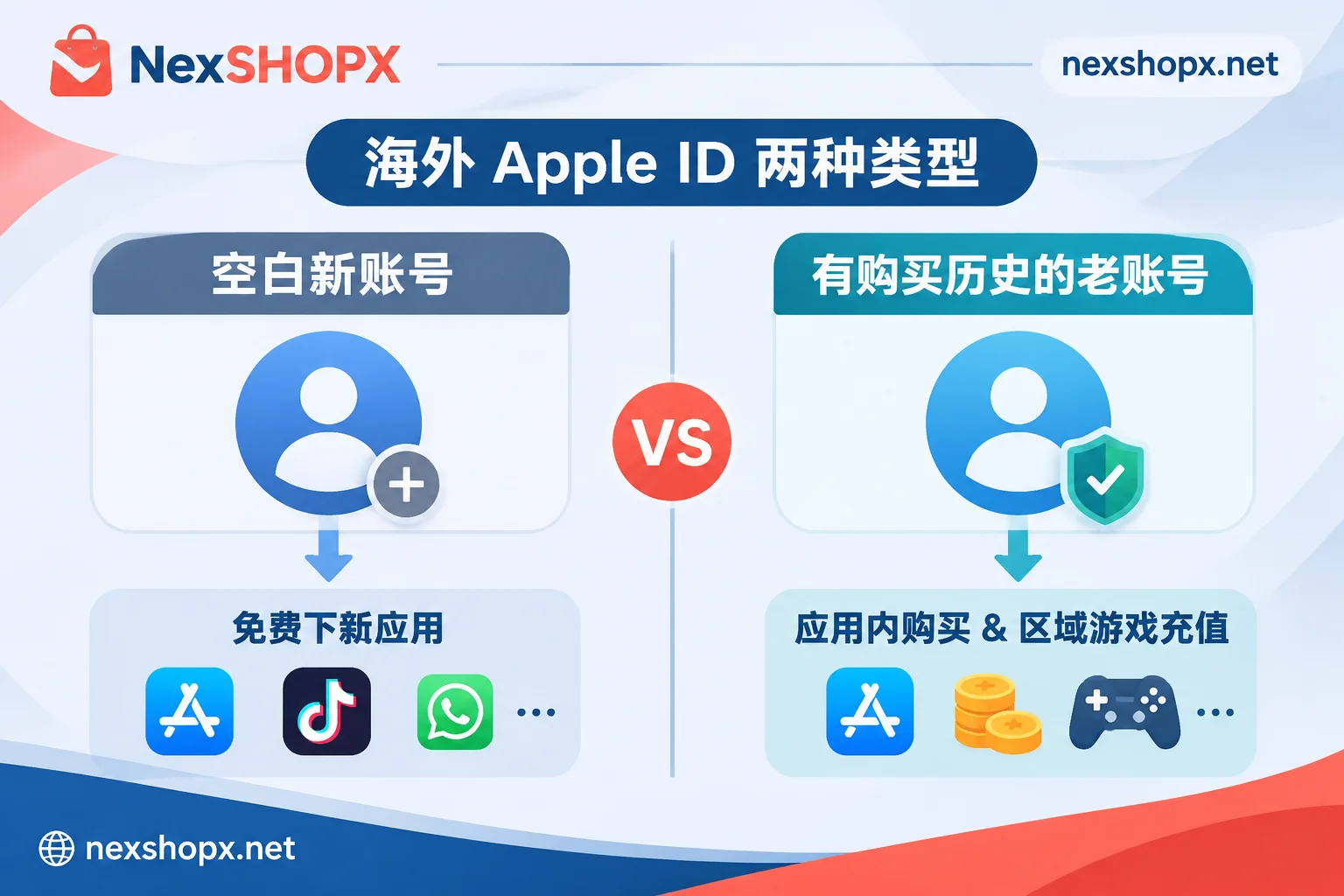
1. Blank New Accounts (No Balance): Born for "Pure Download and Update"
If your core purpose of purchasing an Apple ID is to batch install overseas apps on your team's work phones—such as downloading TikTok, Instagram, Facebook, X (Twitter), Telegram, WhatsApp, or installing official mobile apps like ChatGPT, Claude, CapCut—then blank new accounts are the most cost-effective choice.
- Core advantages: Clean account status, already configured with compliant billing addresses for the corresponding country, saving you the trouble of looking up postal codes and formatting phone numbers.
- Usage boundary: Only log in to the App Store (Media & Purchases) and click to get free apps. No fund top-up is involved, so Apple's payment anti-fraud review will not be triggered at all.
2. Old Accounts with Purchase History: For "Region-Specific In-App Purchases and Paid Apps"
If you must purchase paid apps through the App Store, or make in-app purchases for games and apps in specific regions (such as Japan, Taiwan, US, Turkey), never use a blank new account to directly top up.
- Core advantages: Old Apple IDs with purchase history have already left real historical consumption traces in the Apple ecosystem, and their account weight and trust level are far higher than newly created blank accounts.
- Pitfall avoidance: Even with an old consumption account, after first logging in on a new device, it is recommended to first download one or two free apps to adapt to the environment, avoiding immediate high-frequency, large-amount continuous deductions after cross-device first login.
III. Breakthrough Approach: Why Are In-App Purchases Always Blocked? Try the Dual-Track Solution of "Apple ID Download + Direct Membership Top-Up"
In 2026 search demands, a significant portion of users purchasing overseas Apple IDs are actually just using them as a "payment springboard"—because they don't have overseas credit cards, they want to buy a US or Turkey Apple ID, then buy gift cards to top up subscriptions for ChatGPT Plus, Claude Pro, or Netflix.
However, this path not only bears the gift card premium but also faces the "Purchase Could Not Be Completed" review interception mentioned above. To address this pain point, a more efficient approach is to separate "app download" and "membership subscription":
- Step 1: Use a blank new account to solve client downloads
Purchase a blank new Apple ID for the corresponding region at NexSHOPX, log in to the iPhone's App Store, and directly download genuine clients such as ChatGPT, Claude, Netflix, Spotify, Telegram, X, etc. to your phone. Step 2: Bypass gift card review and go directly for membership proxy or exclusive ready-made accounts
Instead of forcing your way through gift card in-app purchase risk control within the App Store, directly choose the corresponding membership service at NexSHOPX (supporting Alipay and USDT settlement):- AI tool upgrades: If you already have a personal account, you can directly choose ChatGPT Plus / Pro proxy or Claude membership proxy to activate or renew on your own account, retaining complete usage records; if you don't have an account yet, you can also directly purchase OpenAI (ChatGPT) ready-made accounts or Claude Pro / Team exclusive ready-made accounts.
- Social media blue badges and premium benefits: To unlock Telegram premium features, you can use Telegram membership proxy to remotely top up Premium with just a username, without providing a password or verification code; for Twitter matrix operations, you can pair with X / Twitter membership proxy or Grok membership top-up.
- Streaming and productivity tools: We provide Netflix ready-made accounts and proxy services for multiple regions including US, Japan, Turkey, Hong Kong, and Taiwan, as well as music, video, game accounts and membership subscriptions for Spotify, YouTube, CapCut, etc.
This combination of "Apple ID for downloads, dedicated proxy for subscriptions" not only leverages the role of overseas Apple IDs in unlocking the global app ecosystem but also fundamentally avoids the risk of Apple store balances being locked by risk control.
IV. Cross-Border Team Procurement Practice: Synergy Between Apple IDs and Multi-Platform Business Matrices
For cross-border e-commerce store operators, overseas social media operations, and advertising teams, purchasing overseas Apple IDs is often the first step in building a mobile work phone matrix. To make the entire business run smoothly, Apple IDs need to be configured in coordination with other underlying accounts (for more role-based account allocation logic, refer to "Enterprise Overseas Account Procurement SOP: How Do Going-Global Teams Configure Multi-Platform Accounts and AI Memberships by Role and Business Flow?"):
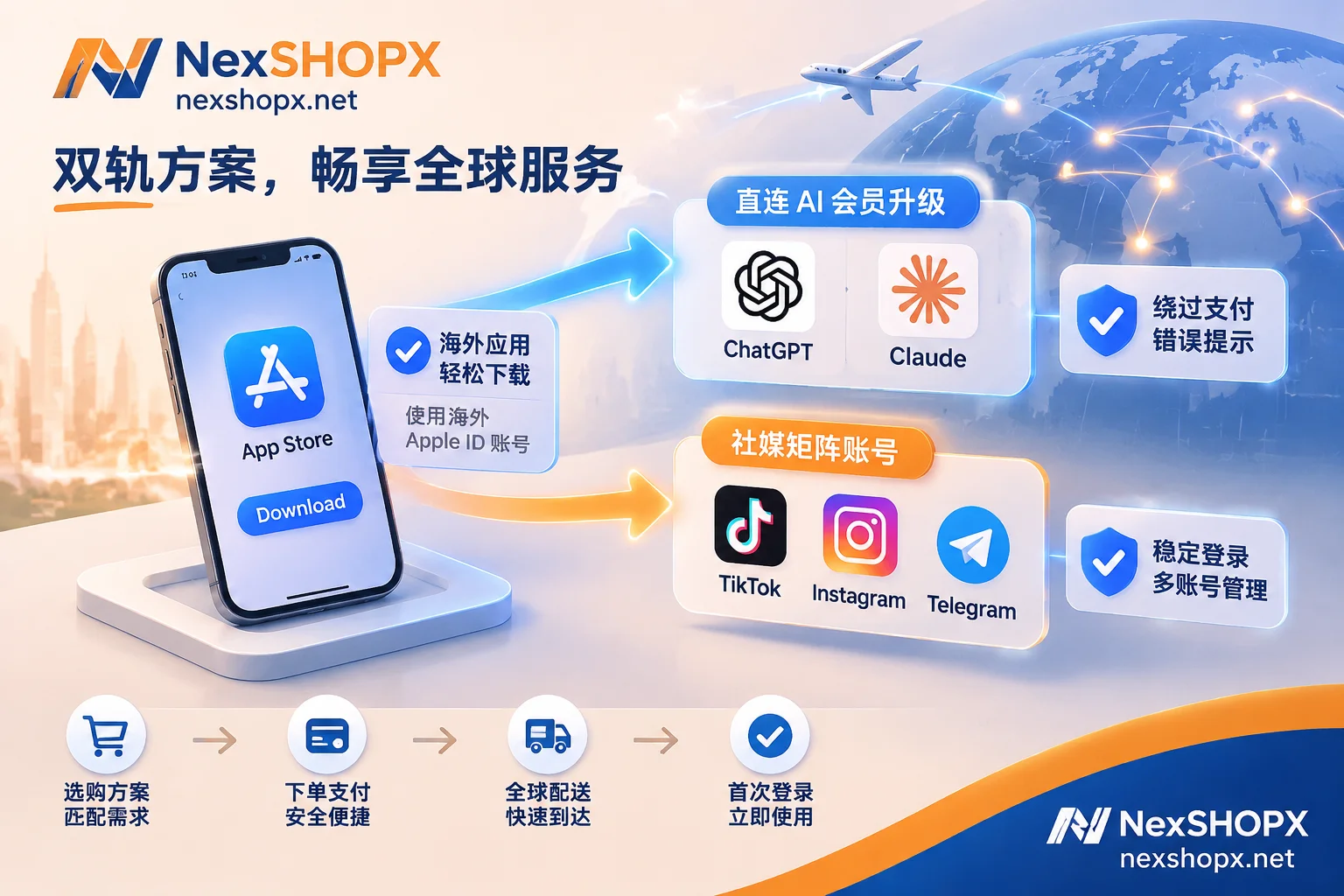
- Short video and live commerce teams: After purchasing Apple IDs for US, UK, Japan, or Southeast Asia (Indonesia, Thailand, Vietnam, Philippines) to download region-specific apps, you can directly pair with TikTok accounts (including regular content accounts and advanced accounts that can open TikTok Shop and do live commerce) that have been matched with environment parameters for the corresponding region, as well as Instagram accounts and Threads accounts to quickly launch content distribution.
- Ad placement and private domain customer acquisition teams: After equipping iOS devices with clients, connect Facebook ad accounts and BM business manager accounts, Facebook second-time appeal old accounts according to advertising needs, or book Telegram accounts and WhatsApp Business accounts with corresponding country codes to receive private domain traffic.
- Underlying email and security takeover: Whether for long-term maintenance of your own overseas Apple ID or binding various social media business accounts, it is recommended to equip independent Gmail exclusive ready-made accounts, Outlook / Hotmail email accounts, or overseas email accounts such as Yahoo and Proton for receiving verification emails and security notifications, achieving isolated management of "one account, one email."
V. Overseas Apple ID First Login Standards and Ironclad Security Anti-Lock Rules
Buying a high-quality ready-made account is only the first step; non-standard login operations can also trigger Apple's security suspension mechanism. After receiving the account, please strictly follow these operational guidelines (if you encounter abnormal prompts, you can also refer to "Password Correct but Keep Getting Login Failed? Check Five Causes, Handle First Login of Newly Bought Accounts Like This" for troubleshooting):
- Strictly forbidden to log in to iCloud, only log in to App Store
Apple IDs delivered by NexSHOPX are all not activated for iCloud. After getting the account, please open iPhone "Settings" → tap your name at the top → enter "Media & Purchases," first sign out of the current store account, then log in with the newly purchased overseas Apple ID (or directly log in within the App Store app). Absolutely do not log in to the purchased overseas account at the iCloud entrance at the top of system settings, to avoid confusion in personal contacts synchronization or device lock risks. - Grasp the first login time limit and modification rules
After placing an order at NexSHOPX Store, in-stock items will be automatically delivered after payment confirmation; guest orders can also directly retrieve account information with the order number on the Order Inquiry Page. After receiving the account, please complete the first login within the time limit specified on the product page. Regarding whether you can immediately change the password or bound information, please strictly follow the instructions on the corresponding product page—some specifications prohibit modification of underlying information during the warranty period, and blindly changing immediately may trigger remote security locks (see detailed rules in "Can the Seller Still Log In After Buying an Account? Check Three Channels and Recover in Order"). - Avoid high-frequency account switching on a single device in a short time
If the same iPhone switches between three or four Apple IDs from different countries within a few minutes, it is highly likely to be judged as an abnormal device by Apple, causing the account to pop up "This Apple Account has been locked/disabled for security reasons." For multi-region business, it is recommended to fix partitions by device. - Clarify warranty boundaries and use compliantly
NexSHOPX provides clear Terms of Service and Warranty Rules, supporting replacement according to rules if disabled during the warranty period; however, if abnormal conditions occur due to failure to log in on time, violation of product page information modification restrictions, account sharing among multiple people, or triggering platform anti-fraud mechanisms, it is not covered by the warranty. If you have bulk procurement needs for cross-border teams or need to confirm inventory of old accounts in specific regions in advance, please feel free to contact Telegram Online Customer Service for consultation on pricing and customized account allocation plans.