 NexSHOPX-官方新闻
To secure bulk discounts for enterprise overseas account procurement without wasting budget on hoarding and reimbursements, the core approach is simple: first place 2–5 small trial orders to verify specifications, then order and perform first login in batches according to the operations team's network environment and capacity, and have a dedicated person use a unified settlement entry and order ledger to separately record "one-time account assets" and "recurring membership renewals."
Many cross-border e-commerce, overseas social media matrix, and going-global R&D teams fall into pitfalls in early procurement—not because they pay a few extra bucks per unit, but due to two extreme practices: either buying dozens or hundreds of accounts all at once for convenience, only to find the operations environment isn't ready and staff can't log in in time, missing the first-login warranty deadline specified on the product page (and paid orders usually cannot be canceled); or letting employees use personal cards to buy accounts and AI memberships and then submit screenshots for reimbursement, leading to currency and exchange rate mismatches, accounts being taken away by individuals after departure, and deactivated memberships still auto-renewing.
If you have already clarified which platform accounts each role and business flow should be equipped with and completed the 5 basic verifications before ordering, the following batch implementation process for enterprise procurement specialists, operations supervisors, and finance will help you connect "buyable, stable to use, clear accounting, and recoverable" in one go.
I. Why is "hoarding enough for a quarter" the biggest taboo in enterprise bulk procurement?
In traditional office supply procurement, "buy a quarter's worth at once to get the lowest price" is common sense; but in overseas account and digital entitlement procurement, this惯性 thinking often directly leads to asset write-offs.
- Conflict between first-login warranty window and non-cancellable mechanism: Mainstream overseas account procurement platforms usually set clear first-login deadlines for finished accounts (see when to complete first login for purchased accounts). Take NexSHOPX, a virtual account and membership procurement mall, as an example: the platform explicitly stipulates in its Terms of Service that unless otherwise specified, orders cannot be canceled after successful payment, and failure to complete first login within the deadline specified on the product page, violation of data modification restrictions during the warranty period, or multi-person sharing and abnormal operations triggering anti-cheat mechanisms are not covered by the warranty. If you order 100 accounts at once but can only manage to log in 10 per day, the latter half lose warranty protection before they are even started.
- Accounts are just entry tickets; buying without a ready environment is wasted: In 2026, major overseas platforms are extremely strict about multi-account logins on the same device, IP pollution, and abnormal behavior. Before ordering, teams must have multi-account fingerprint browsers, independent proxy IPs, and if necessary, SMS verification tools configured—note that NexSHOPX only provides finished account procurement and membership activation services, not fingerprint browsers, proxy IPs, SMS verification, or solutions to bypass platform risk control; this infrastructure must be independently prepared by the enterprise's technical or operations side in advance.
- Mixing "ready-to-use" and "manual scheduling" in one order: Regular email and some social media accounts are in-stock and auto-delivered, while specific-year old accounts or cross-border store accounts require advance booking with customer service. Mixing them makes it easy to misestimate launch dates and slow down business startup.
II. Standard Three-Step Method for Enterprise Bulk Procurement: Trial Order, Negotiation, and Batch Delivery
To balance negotiation room for bulk procurement and first-login security, it is recommended that enterprises directly lock in a "three-step" procurement rhythm:
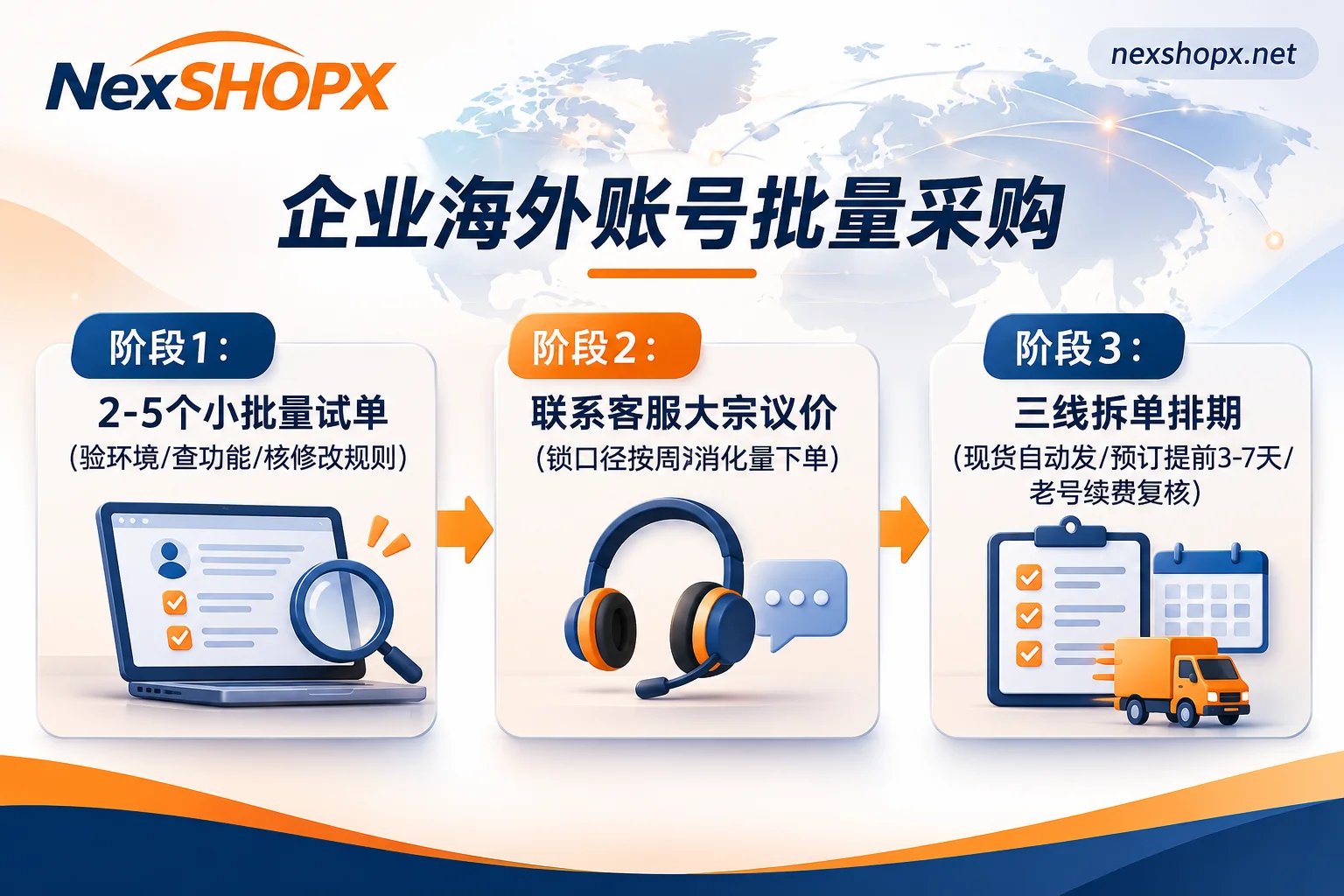
Step 1: Use 2–5 accounts for a "minimum business closed-loop trial order"
No matter how attractive a supplier's quote is, when purchasing a new specification for the first time (e.g., TikTok e-commerce accounts in a specific region, twice-unlocked old Facebook accounts, or Outlook email with IMAP/POP/SMTP), have operations and procurement jointly place a trial order for 2–5 accounts.
The trial order focuses on verifying three things:
- Login and verification smoothness: Whether first login works normally under the established proxy and browser environment, and whether the accompanying recovery email or 2FA key can be successfully taken over;
- Whether functional boundaries match the business: For example, some email specifications only support receiving but not sending, and some Outlook accounts are lower-priced "locked pending unlock" specifications that require the buyer to verify once with their own phone number before use;
- Product page modification rules: Confirm whether password changes or data rebinding are allowed immediately during the warranty period, to avoid breaking warranty conditions due to misoperation on the first day of the trial order.
Step 2: Contact customer service for bulk negotiation, but order in batches based on weekly consumption
After the trial order runs smoothly, enter the bulk procurement phase. Go to the Enterprise Overseas Account Procurement category overview page to confirm the required categories; enterprise customers can view basic specifications through the NexSHOPX mall (https://shop.nexshopx.net), and for bulk orders, contact customer service (https://t.me/nextipkf) directly to discuss tiered pricing and supply rhythm.
The key technique is "lock in terms, not dead inventory": after negotiating bulk prices and specification standards with customer service, do not take delivery of three months' usage all at once into a local spreadsheet. Instead, order and take delivery in batches according to the number the operations team can complete environment binding and first login for each batch (e.g., 10–20 per week), ensuring every batch completes acceptance within the specified first-login deadline.
Step 3: Split the procurement list into three scheduling lines: in-stock, pre-order, and proxy recharge
Supply methods vary greatly across platforms, so the enterprise procurement table must indicate the delivery form (refer to the difference between in-stock auto-delivery and pre-order products) to avoid business departments urging orders only when launch is imminent:
| Procurement line type | Typical covered categories (subject to real-time official website pages) | Delivery and communication method | Enterprise scheduling suggestion |
|---|---|---|---|
| In-stock auto-delivery line | Gmail, Outlook, Apple ID, regular region Instagram / Facebook / TikTok, OpenAI and Claude finished accounts | Self-service order, auto-delivery after payment confirmation, credentials displayed directly on the order page | Order on the day the environment is ready, complete first login and basic acceptance the same day |
| Customer service pre-order/manual line | 2007–2019 early Twitter old accounts, cross-border e-commerce accounts (Shopify/OLX pre-order), Telegram and WhatsApp Business accounts on-demand pre-order, Telegram membership activation | Need to contact customer service first to confirm region, year, stock, and quote; manual processing and delivery | Initiate inquiry at least 3–7 working days in advance, aligned with project schedule |
| Old account proxy recharge/renewal line | ChatGPT Plus / Pro activation, Claude membership activation, Grok / X blue check and streaming memberships | Activate or renew on the team's own original account (some require login information, TG membership only requires username) | Track expiration dates of each seat, centrally review active list before expiration, then renew uniformly |
III. Centralized Procurement vs. Employee Advance Payment: How to Streamline Financial Reconciliation and Voucher Retention?
When a team has more than 5 paid accounts and AI memberships, continuing to let salespeople use personal cards to pay overseas official websites in USD and then reimburse often gets stuck in three areas:
First, invoices and header information are hard to unify. Overseas software and platforms such as OpenAI and Anthropic are foreign billing entities. Although they support adding the company's English header and tax ID in the backend and exporting English Invoices or Receipts, issued bills usually cannot be retroactively modified, and direct overseas official payments cannot directly provide VAT electronic invoices within mainland China's tax system. When handling overseas expenses without paper invoices, domestic enterprises need to separately configure alternative voucher standards such as consumption transaction screenshots, procurement approvals, and scenario descriptions; they cannot directly apply domestic paper invoice or fully digital invoice logic.
Second, multi-currency exchange rates and team seat billing are implicitly complex. Employee personal foreign currency card advances involve deviations between actual settlement exchange rates and bookkeeping rates; and if the team uses a corporate card to directly activate official Team seats, adding seats mid-term is immediately prorated and charged, while removing members usually does not trigger an immediate refund—the reduction only occurs in the next billing cycle. Finance facing multiple fragmented English bills and exchange differences at month-end can easily lead to reconciliation chaos.
Third, the national electronic voucher accounting data standard and internal control traceability trend. As the Ministry of Finance and other departments comprehensively promote the application of electronic voucher accounting data standards, enterprises are increasingly required to have standardized full-chain traceability from procurement, approval, and payment to electronic archive filing.
Therefore, when enterprises centrally procure overseas accounts and memberships, it is recommended to streamline the financial flow according to the following 4 points:
- Unify settlement in RMB (CNY) and eliminate personal foreign currency advances: When purchasing on NexSHOPX, all products are uniformly settled in RMB (CNY), supporting Alipay and USDT payments. The company designates a procurement specialist or administrator account for unified payment, so finance only needs to check RMB payment records against internal purchase orders, eliminating multi-currency conversion disputes.
- Use order numbers for closed-loop traceability of every expense: NexSHOPX supports registered account orders and also allows guest orders to retrieve account information via order number on the Order Inquiry Page. Regardless of the ordering method, enterprise procurement must bind and save order number, Alipay/USDT payment receipt, and internal project approval number to ensure every payment can be precisely traced back to which accounts were delivered.
Strictly distinguish "one-time asset procurement" from "recurring membership renewals":
- Finished account purchases are one-time asset procurement; after being entered into the enterprise asset ledger, they no longer generate hidden charges;
- AI and streaming membership activations (such as ChatGPT Plus/Pro, Claude Pro/Max, X Premium, Netflix, etc.) are recurring consumption billed monthly or by duration. Do not blindly auto-renew without review; it is recommended to set a fixed day each month for procurement or operations supervisors to check the list of seats "still employed and with actual usage needs," eliminate idle accounts, and then contact customer service or reorder for renewal.
- All prices, inventory, and after-sales terms are subject to real-time official website pages: Before procurement, be sure to screenshot or record the product page specifications, warranty duration, first-login deadline, and terms of service on the order day as the basis for internal acceptance and financial verification.
IV. Preventing "account loss when people leave": How to create a dual-track ledger for enterprise account assets?
Many going-global companies' most painful lesson is not accounts being banned, but after core operations or ad buying staff leave, they take away social media accounts bound to enterprise clients and historical data, or AI accounts that have accumulated business prompts.
To plug this loophole, enterprise overseas account procurement must link "order delivery" with "asset ownership" at the moment of delivery; users must not hold all credentials themselves:
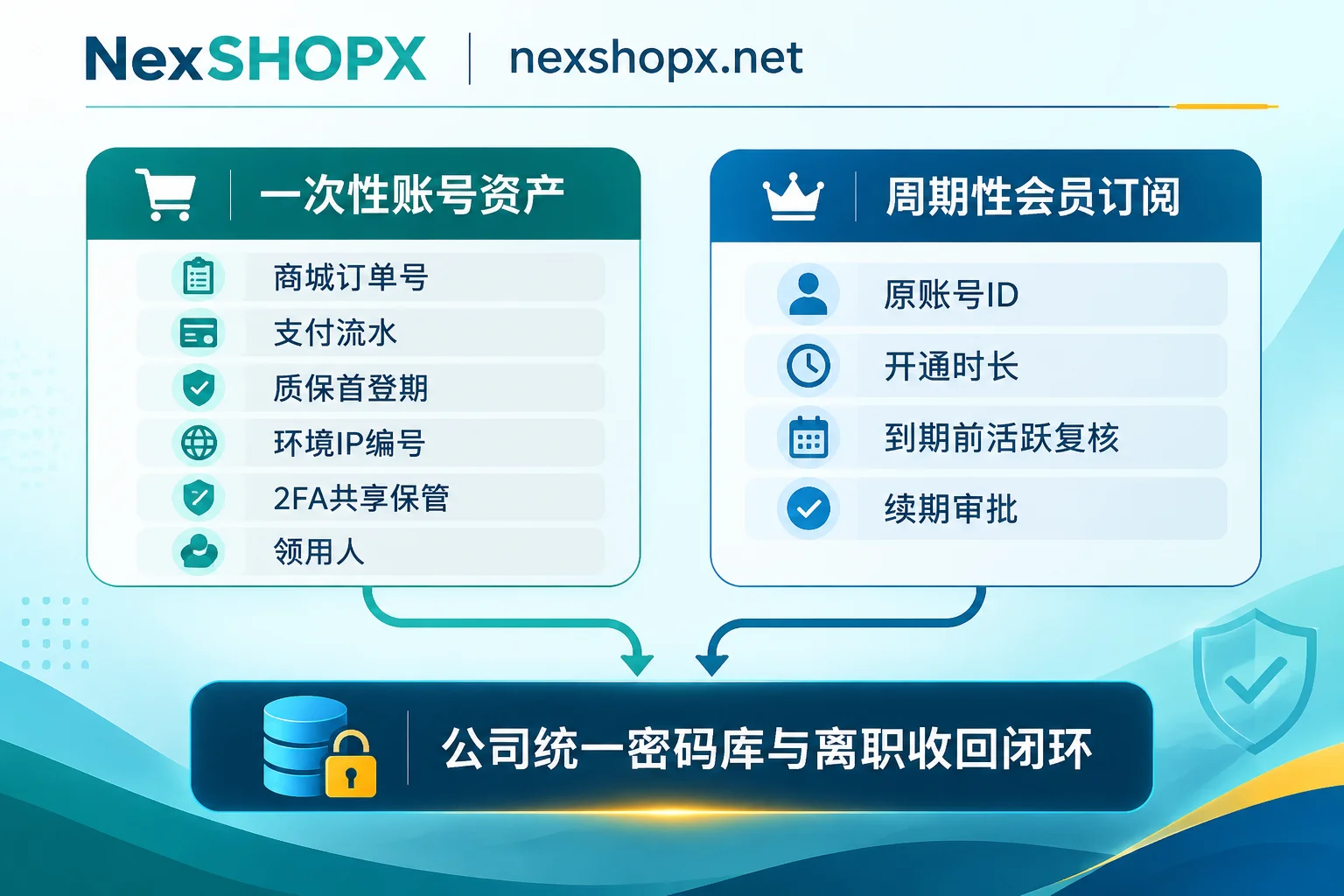
It is recommended that procurement and operations/administrators jointly maintain an encrypted shared ledger containing at least the following 6 core fields:
- Mall order number and procurement date: Used to trace supply source, verify warranty expiration date, and financial reconciliation.
- Platform, region, and specification notes: Such as "US region TikTok live account," "X old account registered in 2016," "Claude Pro personal account," facilitating subsequent cross-department transfer and role-based circulation.
- Independent environment and proxy number: Record which cloud phone, fingerprint browser configuration, and static IP the account is bound to within the team, to prevent different personnel from mistakenly logging in from local environments and triggering anomalies.
- Account credentials and auxiliary recovery channel ownership: Initial passwords, bound recovery emails/phone numbers, and TOTP two-factor authentication secrets (2FA Secret) must be centrally stored in the enterprise shared password vault; never bind them only to an employee's personal phone.
- Data modification restriction flag: If the product page states "no data modification during warranty period," it must be bolded in the ledger to prevent the successor from accidentally modifying and losing warranty on the first day.
- Current assignee and departure recovery records: When employees transfer or leave, administrators should recover permissions item by item, reset passwords, and change authorized sessions according to the account handover checklist template.
V. Final Check Before Enterprise Bulk Ordering (5-Point Self-Check List)
Before sending out this week's purchase order, the procurement lead should spend 2 minutes checking these 5 items, which can basically avoid 90% of enterprise procurement pitfalls:
- Receiving environment ready first: Are fingerprint browsers, independent proxy IPs, and phone numbers for buyer-provided SMS verification/unlocking allocated?
- Trial orders for new categories: For platforms or new regional specifications never purchased before, have 2–5 trial orders been used to verify login and functional boundaries?
- In-stock in batches, pre-order in advance: Are in-stock orders controlled within the team's capacity to complete first login that day? Have pre-order categories requiring customer service confirmation started inquiry 3–7 days in advance?
- Centralized settlement with order numbers retained: Is payment uniformly made by the company via Alipay/USDT (CNY), and are mall order numbers and payment records archived together for easy review on the Order Inquiry Page?
- Compliant use and warranty boundaries aligned: Have all assignees been informed of the red lines—"no illegal use, no unauthorized modification of warranty-restricted data, no private lending of accounts"—and have all specifications, prices, and warranty periods been checked against NexSHOPX's real-time official website pages?