 NexSHOPX-官方新闻
No. Regardless of whether you bought a regular new account, an aged account, or a second-time reinstated account, within the first 24 to 48 hours after switching to a new device and network environment, it is not advisable to immediately change the password, rebind email, reset 2FA, and even more so, do not directly pull it into BM (Business Manager / Meta Business Suite), bind a credit card, or start running ads on the first login day.
The core reason why so many people encounter "locked upon login" or "identity verification required after password change" right after purchasing an account is that in 2026, Meta's automated risk control evaluates the overall credibility of the account's historical behavior, current login environment, payment chain, and associated assets. An account originally operating on another network and device suddenly undergoes three highly sensitive actions simultaneously in an unfamiliar environment: "password change + rebinding + connecting commercial assets." The system will almost inevitably determine it as account theft or abnormal takeover.
Below, we break down in operational order how to verify status on the day of receipt, on which day you can change information and connect BM, and how to avoid crossing the red lines of after-sales warranty and asset contagion.
I. Why Does a Purchased Account "Get Locked When Changing Info, Get Restricted When Connecting BM"?
Before taking action, understand the two core criteria that Meta's risk control is currently focusing on, so you don't repeatedly pay tuition:
- Simultaneous multi-variable mutations trigger security locks: Device change, IP region change, password change, email/2FA change, adding BM permissions—each of these alone may not cause trouble, but all stacked and executed concurrently within hours after first login multiplies the risk. The industry-wide principle is Change One Variable at a Time, letting the system digest the environment switch first, then handle information and business permissions.
- Rising risk of cross-contagion among asset clusters: Meta's anti-fraud system now cross-references admin graphs, payment card information, Pixel, domains, and historical violation records. If a personal account that hasn't yet established a foothold directly connects to a core BM or binds the same commonly used card, once that personal account triggers a review, it can easily affect other ad accounts and pages under the same business asset.
II. On the First Login Day: Check These 3 Things First, Don't Rush to Change Settings
If you are still comparing the applicable scenarios of different specifications, you can first go back to the Facebook account purchase category page to compare the differences between regular accounts, aged accounts, ad-running accounts, BM business management accounts, and accounts with pages; if you specifically need an ad foundation account that has been appealed and restored, can change currency, and can bind payment, you can also check the Facebook aged accounts / reinstated accounts section (you can also refer to the site's 2026 specification selection and configuration guide and post-video-selfie verification receipt checklist for cross-checking).
After selecting the specification and receiving the delivery credentials, perform the following three-step check on the first login day:
1. Isolate the Environment First, Then Enter Credentials
- Clean or isolate the browser environment: Do not log in directly in a browser window that has previously been banned. Clear history cache and cookies in advance, or use an independent isolated browser profile.
- Keep region, time zone, and language consistent: The network exit region, system time zone, and browser language should match the account's own region as much as possible.
- Note: NexSHOPX primarily deals in finished accounts and membership activation, and does not provide proxy IPs, fingerprint browsers, or network nodes. Such login infrastructure needs to be prepared with a stable solution in advance.
2. Verify the "First Login Time Limit" and "Information Modification Restrictions" Stipulated on the Product Page
This is a step many people easily overlook. Accounts of different specifications vary greatly in after-sales rules. Be sure to confirm the instructions on the corresponding product page before ordering and logging in:
- Complete first login on time: Common rules require completing the first login within the specified time limit after order delivery; failure to log in on time may affect warranty eligibility.
- Check whether information modification is prohibited during the warranty period: Some categories explicitly prohibit changing the password or core information during the warranty period. If you directly change the password without reading the instructions, even if you could originally get a replacement through after-sales, you will lose the warranty due to violating the modification restrictions (for specific boundaries, refer to common judgment explanations on inability to modify information during warranty period).
3. Open Account Quality Immediately After Entering to Check Health
After successfully logging in, first visit business.facebook.com/accountquality (Account Quality / Business Support Home):
- Confirm that the personal account itself and its built-in ad permissions are in normal usable status, with no unresolved identity verification pop-ups or restriction prompts;
- Confirm that the delivered 2FA key or bound email can be used normally (do not delete the original authenticator or email yet; first verify that you can smoothly receive verification codes).
III. On Which Day Can You Change Password, Connect BM, and Run Ads? Phased Transition Timeline
To maintain account survival rate, it is recommended to split the first 7 days after takeover into three phases, advancing at a single-variable pace:
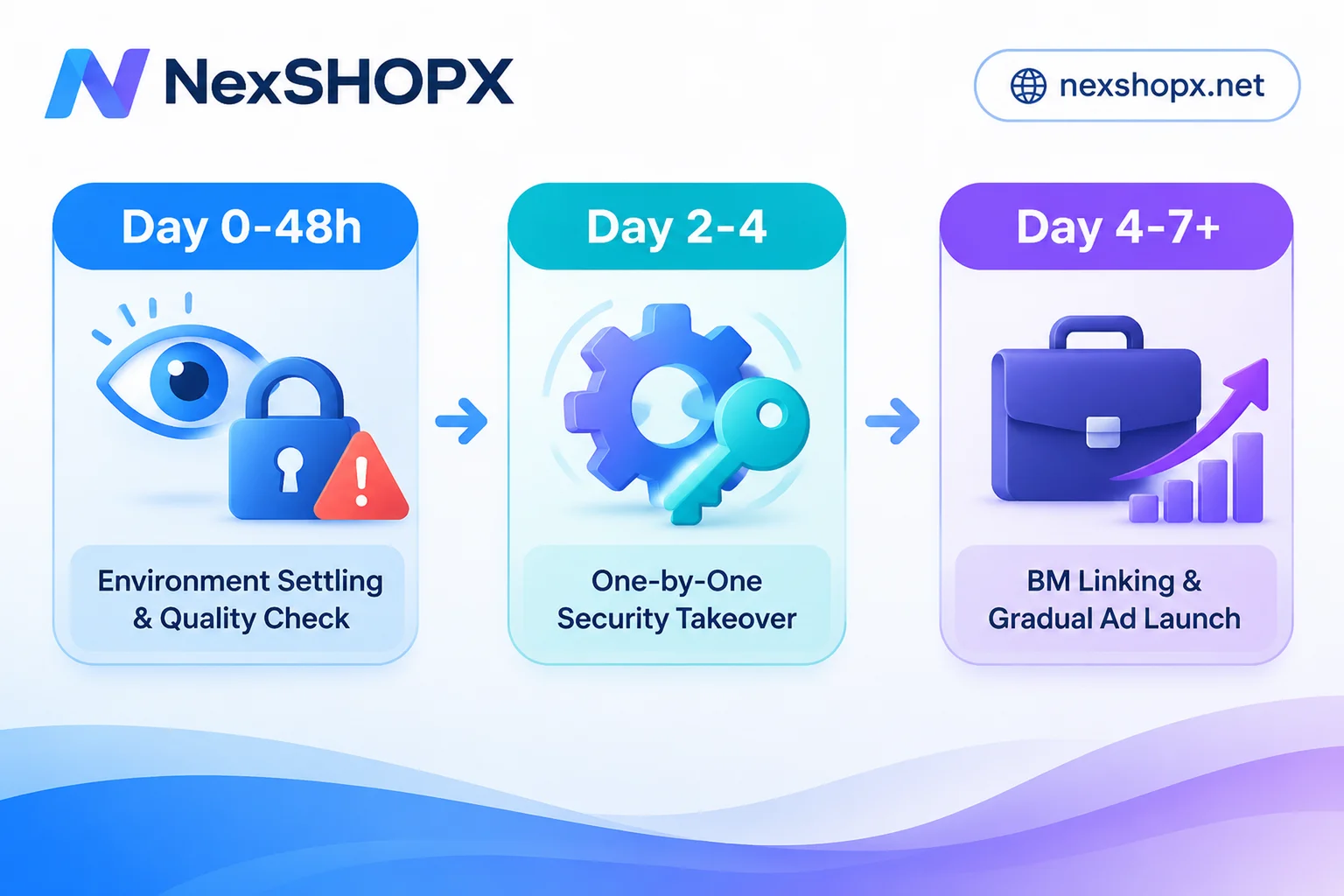
Phase 1: 0–48 Hours (Environment Adaptation Period)
- Allowed actions: Normally browse the news feed, watch videos for a few minutes, occasionally like lightly, maintain natural activity for 15–30 minutes per day, letting the Meta system establish a stable session on the new device and fixed IP.
- Prohibited actions: Do not change password, do not change name or avatar, do not rebind email/phone number, do not kick out all historical login devices at once, and do not rush to add a large number of strangers, join groups in bulk, or pull into BM.
- How to handle if the account itself is abnormal: If you strictly log in on time in a clean environment and still find that the account was disabled or cannot log in before delivery, keep complete screenshots, then go to the NexSHOPX order query page with your order number to check the order, and promptly contact Telegram customer service to handle according to the warranty terms on the corresponding product page.
Phase 2: Days 2–4 (Secure Takeover Period)
- Prerequisites: Confirm that the account has no abnormal pop-ups in the first 48 hours, and the product page allows modification of the corresponding information (if the warranty period has not expired and the product page prohibits modification, wait until the warranty window passes before acting).
Operation order (change only one item at a time, with at least several hours interval):
- First log in and check whether the bound external email itself is secure (if email control was delivered along with the account, securely take over the email first).
- After confirming there are no unfamiliar abnormal sessions in the security center, update the login password as needed, and check Passkey or authenticator configuration. For the specific security check order after the launch of the Meta Accounts unified account center, it is recommended to check item by item against the site's Meta Accounts and Passkey takeover security settings guide.
Phase 3: Days 4–7 and Beyond (BM Integration and Test Advertising Period)
Safe practices for connecting BM:
- After the personal account has established a foothold, join BM via email invitation, or use a specification that already includes BM;
- After entering BM, let it sit and observe for 24 hours before assigning page, Pixel, and ad account permissions. Do not pull in multiple new admins simultaneously right after entering BM.
Payment binding and scaling节奏:
- Try to ensure the payment cardholder/entity logic is reasonable, and avoid using prepaid/virtual cards that frequently fail deductions or have been heavily flagged by risk control;
- Start the first round of test budget with a low amount, confirm that deductions and reviews are normal before gradually scaling up, avoiding drastic budget fluctuations on the first day.
IV. The 3 Most Common Blind Spots in "Preventing Contagion and Warranty" When Running Business
- Treating "aged/reinstated accounts" as "immunity"
Although second-time reinstated accounts have been restored through appeals and generally have stronger anti-risk-control foundations than pure new accounts, in 2026 Meta's review of landing page transparency and fraudulent/misleading ads also applies to the ads themselves. Landing pages lacking real contact information, unclear delivery or return policies, or promoting restricted categories without compliance statements will still trigger account-level restrictions. In addition, restrictions caused by aggressive advertising are generally not covered by warranty on any platform (including NexSHOPX). - Multiple people sharing and logging in from different locations simultaneously
After buying an account, having operations, media buyers, and designers log in and operate simultaneously from different cities is the fastest way to ruin the account. For multi-person collaboration, use BM role permission distribution (assign page and ad account permissions to each person's fixed compliant account), and do not share the same personal credentials among multiple people. - Putting all assets on a single account
Any important page, Pixel, and BM business management platform should, after stabilization, be configured with at least two admins for permission redundancy, and separate "asset ownership" from "daily advertising operations" to prevent core data from being locked together when a single test account has problems.
V. How to Purchase on Demand and Minimize Trial-and-Error Costs?
If you are currently preparing to build or expand an overseas social media and advertising matrix, it is recommended to first use a small number of accounts to run through your own IP, browser isolation, and 7-day transition process, then scale up based on actual survival rate and consumption rhythm:
- Quick testing with in-stock items: You can register or order as a guest directly on the NexSHOPX self-service mall, supporting Alipay and USDT (CNY settlement). In-stock items are automatically delivered after payment confirmation, and you can extract information on the order page within minutes and perform first-login verification according to the above process.
- Specific specifications and bulk needs: If you have clear requirements for account region, registration year, with page/with personal ad account, or second-time reinstated specifications, or need bulk purchase negotiation, you can directly contact Telegram customer service to confirm real-time inventory and after-sales details; before ordering, you can also browse the terms of service and warranty rules to clarify the first login time limit and exemption boundaries.
Once you have smoothly run through the selection, first-login check, and 7-day single-variable transition process, a purchased Facebook account can truly transform from "can log in" to "a long-term asset that can securely undertake business."